| 1. Introduction
ChatGPT (Ai) has been recently launched for the Colourisation and Non-Destructive Enhancement of images. This is an alternative process to Photoshop for image enhancement, especially as the latter is unable to remove motion blur, camera shake, or missed focus. The process works by downloading an image and either speaking or writing a precise set of prompt(s) to obtain a colourised and / or enhanced image.
2. Limitations
Whilst ChatGPT colourisation and enhancement struggles with numbers, logos, signs and details, it is possible with a good or series of prompts to obtain an enhanced image that is near on perfect. Some of the issues as described above are exasperated by ChatGPT reducing the size of the downloaded image to around 2000 x 1300 pixels. This could amount to 90% reduction in image size when starting from a scanned image measuring 14400 x 9600 pixels at 2400dpi. Furthermore, the enhanced image is reduced to around 1500 x 1000 pixels.
3. Colourisation
ChatGPT colourises a black and white image by using a ‘generative image model', converting a one dimensional grayscale image into three dimensional colour image. ChatGPT Initially reads the image to identify objects, backgrounds and subjects. It analyses light intensity, shadows and textures in the black and white image to determine the probable colour of each element. Using its massive datasets of coloured images, it fills in the missing colour channels (RGB) to produce a realistic full colour image, whilst preserving the original details. Hue, saturation and lightness all contribute to our perception of colour, but only lightness is present in grayscale images. This is part reason why it is so difficult to accurately colourise Black and White images, as many different colours can have the same lightness value, and thus appear as the same shade of grey in a black-and-white picture even if they are very different in reality.
4. Image Enhancement
4.1 Typically, ChatGPT scans your image to identify the type of blur or artifact present, such as motion blur, camera shake, or missed focus. It recognizes shapes based on millions of training images and reconstructs the edges by utilizing generative algorithms to actually recreate the missing data and simultaneously reduces digital grain and compression artifacts.
4.2 Not Widley known is, that there are two types of image enhancement, destructive and non destructive. Destructive image enhancement does not preserve the original image and prompts may result in unwanted additions / deletions and poor quality, whereas non destructive enhancement preserves the original image and prompt(s) are adjustments made to it and work similarly to smart filters in Photoshop. I do not recommend using destructive image enhancements.
5. Initial Colourisation Prompt
5.1 The heart of producing a realistic colourisation is totally dependent on the precise description of the prompt(s) used to carry it out the task.
5.2 A typical prompt to colourise a black and white image might read; this is an image of (describe the image). Preserve the original photograph exactly in terms of composition, locomotive details, proportions, background, lighting, shadows, texture and period appearance. Do not add, remove or redesign anything. Apply realistic, historically accurate colours appropriate to the locomotive, its livery and the period shown. Colourise the railway infrastructure, track, vegetation, sky, buildings and other background details naturally and realistically. Keep the result photographic rather than illustrated. Preserve the grain, contrast and character of the original image, avoiding overly saturated or modern-looking colours.
5.3 Where a prominent colour cannot be determined reliably from the photograph, use historically plausible colours rather than making dramatic assumptions.
5.4 If you know the livery, it's much better to specify it e.g. British Rail dark brunswick green livery with small yellow warning panels.
6. Initial Non Destructive Enhancement prompt.
6.1 The heart of producing a realisitc non destructive enhancement is totally dependent on the precise description of the prompt to carry it out the task.
6.2 A typical prompt to enhance an image might read; Enhance this image non-destructively. Preserve the original composition, textures, colours, and all existing details. Improve only exposure, contrast, white balance, sharpness, clarity, and noise reduction where needed. Do not add, remove, reshape, or replace anything, and avoid an overprocessed look.
7. Edited Prompts ( Colourisation and Non Destructive Enhancements)
7.1 It’s not uncommon for the initial prompt not to provide the desired enhancement. This can be resolved either by asking ChatGPT what prompt is needed to obtain the desired enhancement or specify an edited prompt.
7.2 During the past few months, I have had to make numerous edited prompts wording as follows,
7.2.1 The number on the front / bodyside of the Class xx locomotive is xxxxx
7.2.2 The name of the Class xx locomotive as shown on the name plate is xxxx
7.2.3 Reduce the size of the number by xx%. Note: ChatGPT may not suitably reduce the size of the numerals. In cases like this, download the image and open it up in Photoshop. Create a copy of the 'background' layer naming it 'background copy' layer and make a selection of the number, placing it onto a new layer named 'number' layer. Turn off the 'background' and 'number' layers, and remove the number from the 'background copy' layer with the Clone Stamp Tool. Turn on the 'number' layer copy and reduce the size of the number with the Tranformation Scale tool.
7.2.4 Tone down the image by xx%
7.2.5 Blur the image with a 0.x pixel gaussian blur
7.2.6 Increase or decrease the exposure by x EV
7.2.7 Very / lightly weather the image
7.2.8 If the number looks too bright select a brush in Photoshop and paint over the number with 5% opacity.
7.2.9 For any other edited prompts, request ChatGPT
|
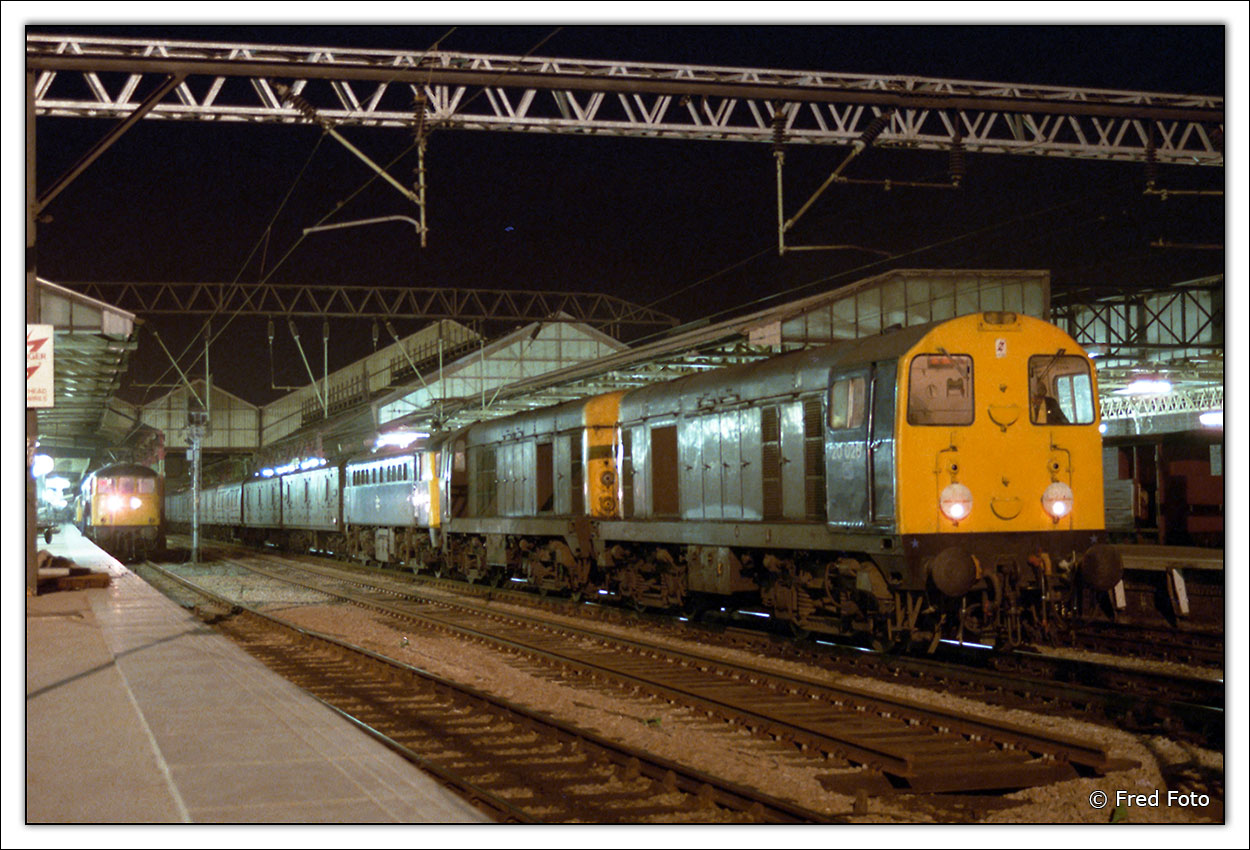
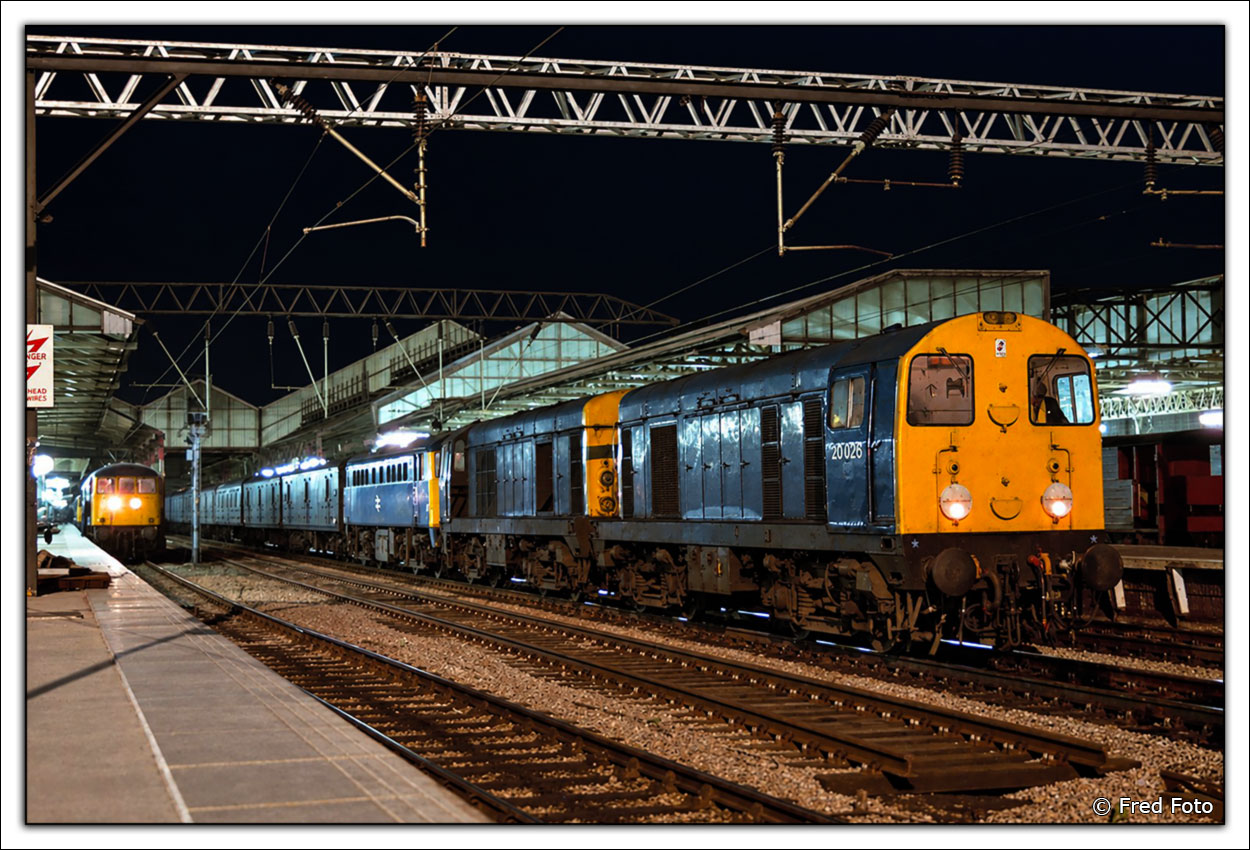
Prompt: Enhance this image non-destructively. Preserve the original composition, textures, colors, and all existing details. Improve only exposure, contrast, white balance, sharpness, clarity, and noise reduction where needed. Do not add,emove, reshape, or replace anything, and avoid an overprocessed look.The number of the Class 20 locomotive is 20026, tone down the image by 25% and blur the image with a 0.3 pixel gaussian blur.
|